
The packing and handover list should identify the complete vehicle and every separate item needed to use and support its advertising system. A line reading “one LED truck” is too broad for checking a shipment. Divide the list into vehicle identity, installed display equipment, loose accessories, software information, agreed spares and documents, then connect each line to the accepted quotation.
Freeze the supplied configuration first
Confirm the screen option, controller, media equipment and power arrangement before preparing the final list. If an item changes during manufacture, revise the specification and handover record together. The buyer should not discover at arrival that a controller model differs from the one described in the operating information.
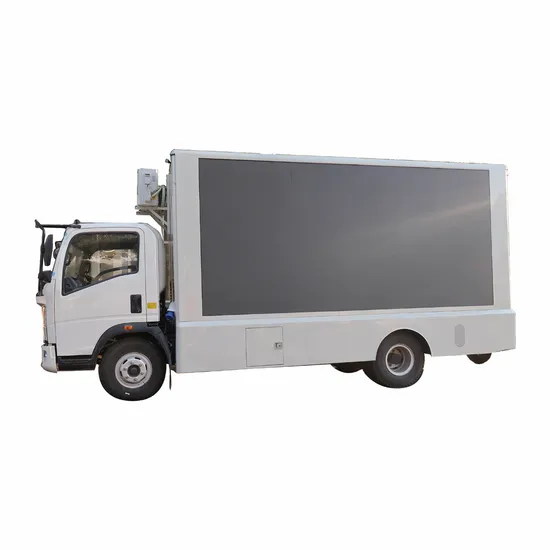
The listed HOWO 4×2 LED advertising truck provides a starting point with P4, P5 and P6 choices in its title. Its catalogue figures include a 3,360 mm wheelbase and approximate exterior dimensions of 5,995 × 2,030 × 3,050 mm. Request the final as-shipped dimensions, weight and configuration for the actual order; catalogue dimensions alone are not a completed transport booking.
Separate installed equipment from loose packages
| List section | What to identify | How the buyer can reconcile it |
|---|---|---|
| Complete vehicle | Vehicle identity and agreed chassis and body configuration | Compare physical identification and supplied vehicle documents |
| Installed display system | Screen configuration, controller models and relevant equipment identifiers | Match to the accepted equipment schedule and drawings |
| Loose accessories | Description, quantity and package number for each agreed item | Count against labelled packages and the packing list |
| Spare components | Part identity, compatibility reference and quantity | Check the spares schedule for the delivered system |
| Software and settings | Supplied software, licence scope and configuration records where applicable | Confirm access and demonstrate the agreed media workflow |
| Manuals and records | Operating documents, equipment information and acceptance records | Check completeness and the agreed language and format |
Not every possible accessory is automatically included. Mark items as installed, packed separately, buyer-supplied or excluded. This is especially useful for computers, cables, audio equipment and spares that may appear in demonstration material but are not part of the purchase agreement.
Make the control system usable after delivery
Ask the supplier to identify the delivered controller and explain the supported process for preparing and loading content. Record the required file formats and the actual screen resolution. Request the configuration information and backups that the supplier recommends retaining for the delivered system, together with instructions on who should use them.
Confirm which software licences or subscriptions, if any, are included and which remain the buyer's responsibility. Arrange secure delivery of any required account access; do not print passwords in a general packing list. Identify the support contact and the information they will need if the operator encounters a problem. A working demonstration file is useful, but it should not be the only means of operating the screen.
Agree transport protection with the shipping parties
The supplier and transport provider should agree the transport-ready condition, protection of exposed equipment, treatment of loose items and the approved securing arrangements for the selected shipping method. Request photographs showing the vehicle and labelled packages before handover, plus the relevant written instructions. Do not improvise structural attachment points from exterior photographs.
Ask the booking party to confirm how the accepted vehicle dimensions and any separately packed items are represented in the shipment documents. Record responsibility for each transport leg, handling and insurance under the agreed commercial terms. Packaging and photographs help document condition; they do not guarantee that transport damage cannot occur.
Use two acceptance records
Complete a pre-dispatch record covering supplied equipment, visible condition and the agreed functional demonstration. Keep the test content and configuration reference with that record. At arrival, compare the delivery against the package count and identifiers, document visible condition and record missing or discrepant items through the agreed reporting channel.
Arrange commissioning and operational acceptance by the responsible personnel under the supplied instructions. Distinguish arrival-condition checks from confirmation that the complete system works as agreed. If equipment is damaged or the configuration differs, record the issue before treating the delivery as fully accepted.
Keep import and advertising permission separate
Ask the destination importer and relevant authorities what vehicle, equipment and shipment documents are required for this particular import. Separately confirm the rules for the planned advertising activity with the responsible local body and event or site operator. Delivery of the truck does not establish permission to play advertising on public roads or at every venue.
For a complete handover proposal, provide the destination, proposed shipping method, selected screen option and the operating team's documentation needs. Request a numbered packing list, an equipment schedule and a responsibility record that use the same configuration reference. These give the buyer a practical way to check what has arrived and what remains outstanding.